From Neighbahood.com:
Get early access to the new Google Play Neighbahood.com social media app.
Dear Neighbahooders,
Neighbahood.com is officially launching our Google Play app in two weeks. However, you can gain early access from the Google PlayStore, allowing you to use the Neighbahood app before its official release date.
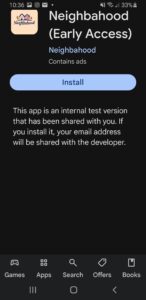
With early app access, you can install and use the social media app from your phone like other platforms, such as TikTok. We are running early access to the app for two weeks before the app goes live. if you would like early access, please use the link below from your phone. This will send you to the Google Playstore to download the app. After you are directed to Google Playstore, you must turn on developer mode for early access to the app. Sounds complex, but it’s fairly easy. Here are the steps with images below:
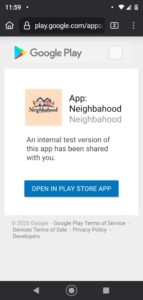
1. Click the link below.
2. The link will open up a page that will tell you to go Google Playstore
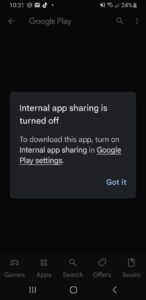
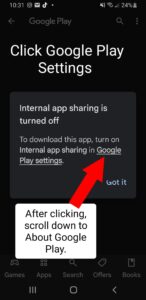
3. On the Google Playstore you will be asked to click GOOGLE SETTINGS.
4. After clicking Google Settings, scroll all the way down until you see “About Google Playstore”.
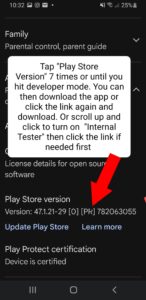
5. Tap About Google Playstore 7 times, when you reach the 3rd tap it will count down to 7.
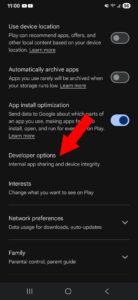
6. You will receive a message that you are now in developer mode. Scroll up to General Settings (depending on your phone). In the submenu click Developer Options.
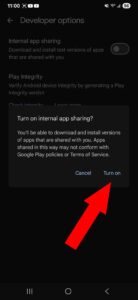
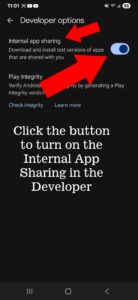
7. When you reach Developer Options you will need to click “Internal App Sharing”.
8. This final step might take you to the install app page, or you can go back to this link by clicking the top arrow and it will automatically open the open app page and you can then install the app.
After this review, Neighbahooders will have access to uploading video. Thank you!
Download the app from your Android phones for early access internal testing for the app: